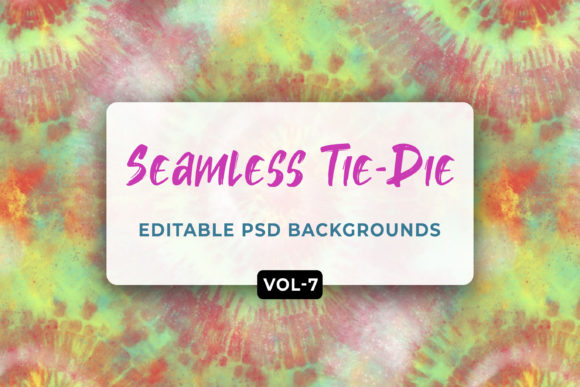
Tie Dye Seamless Patterns Vol-07
Five distinct, hand-crafted tie-dye motifs—each engineered to repeat flawlessly across any surface. Tie Dye Seamless Patterns Vol-07 isn’t just another pattern pack. It’s a practical toolkit for people who need vibrant, cohesive visuals without the time or technical overhead of building from scratch. Whether you’re designing merch for a small-batch clothing line, prepping a client’s Zoom presentation, or refreshing your blog’s visual identity, these patterns offer flexibility grounded in real-world use.
What Makes These Patterns Actually Work—Not Just Look Nice
Seamless doesn’t mean “invisible.” It means intentional continuity: no jarring edges, no mismatched gradients, no awkward gaps when tiled. Each of the five designs in Tie Dye Seamless Patterns Vol-07 was built with precision tiling logic—not as static images, but as living assets. That’s why they scale cleanly from a 2-inch phone case preview to a 10-foot trade show backdrop. The PSD files include layered, non-destructive color groups, so swapping a dusty rose for cobalt blue takes two clicks—not two hours. And because each design is fully editable, you’re not locked into preset palettes or fixed compositions.
Real Use Cases—Not Just “Great for Anything”
Here’s how different users apply Tie Dye Seamless Patterns Vol-07 without reinventing the wheel:
- Apparel designers use the high-res PNGs to test dye placements on mockups before production—adjusting contrast and saturation to match fabric texture and lighting conditions.
- Educators and presenters drop one of the 10 ready-to-use Zoom video backgrounds into their virtual classroom—no cropping, no distortion, just instant visual polish that signals energy and approachability.
- Small business owners layer a subtle tie-dye pattern behind product photography on Instagram posts, creating depth without competing with the subject—especially effective for handmade goods, wellness brands, or creative studios.
- Freelance marketers embed the JPEG versions into email newsletter headers or landing page sections to add rhythm and warmth without slowing load times.
- Hobbyists and crafters print the patterns onto iron-on transfer paper for custom tote bags, pillow covers, or journal inserts—using the editable PSD to mute intensity for lighter fabrics or boost vibrancy for dark surfaces.
Designing With Intention—Not Just Decoration
Patterns carry tone. A tightly wound spiral motif reads energetic and modern; a soft, watercolor-blended swirl feels organic and calming. Tie Dye Seamless Patterns Vol-07 includes deliberate variety—not just color shifts, but structural differences in flow, density, and contrast. That gives you room to match visual language to audience expectation. For example:
- A yoga studio launching a new apparel line might choose Design #3—a low-contrast, airy blend of sage and mist blue—for its calming repetition, then adjust hue balance in the PSD to lean cooler for summer wear or warmer for autumn layers.
- A Gen-Z-focused skincare brand could use Design #1’s bold concentric rings as a background for TikTok thumbnails—then desaturate it slightly and overlay clean sans-serif text to keep readability sharp.
- An educator building a Google Slides template for student workshops might apply Design #5 at 8% opacity behind slide titles—adding texture without distraction, reinforcing brand consistency across dozens of decks.
No Mockups? No Problem—Here’s How to Compensate
The package doesn’t include mockups—but that’s often better. Relying on generic mockups can dilute authenticity. Instead, use the editable PSDs to build your own context: paste the pattern into a simple rectangle in Photoshop or Figma, then place that rectangle over a photo of your actual product (e.g., a real laptop, a flat-lay of a cushion). You’ll get truer lighting, accurate proportions, and faster iteration. Bonus: this method trains your eye to see how patterns behave in real materials—not just on screen.
Keeping It Cohesive Across Formats
When using Tie Dye Seamless Patterns Vol-07 across multiple touchpoints—say, a website banner, matching Zoom background, and printed brochure—consistency comes from restraint, not repetition. Try this:
- Pick one pattern as your primary visual anchor (e.g., Design #2 for its balanced mid-tone base).
- Use the same hue family across all applications—but vary intensity: full saturation for digital screens, 20–30% desaturation for print, and 10% opacity for subtle UI overlays.
- Stick to one consistent scale: if the pattern repeats every 1200px on your website, use the same tile size in your Zoom background and PPT slides—even if you crop or zoom differently.
This approach avoids visual fatigue while preserving recognition. People won’t name the pattern, but they’ll feel the coherence—especially important for brands building trust through consistency.
Why Editable PSDs Matter More Than You Think
Most pattern packs give you flat JPEGs or locked PNGs. Tie Dye Seamless Patterns Vol-07 gives you layered PSDs where color, blending modes, and opacity are separated by element—not flattened into a single image. That means you can isolate the “dye bleed” layer and soften its edge for a gentler look, or boost the “core swirl” layer to emphasize movement. It also means you can export clean vector-like results for SVG use (by saving individual layers as transparent PNGs and reassembling in Illustrator), even though the source is raster-based.
This level of control matters most when your output has strict requirements: a printer’s CMYK profile, a client’s brand hex palette, or accessibility contrast ratios for digital interfaces. You’re not adapting to the pattern—you’re guiding it.
Getting Started—Without Overthinking It
Open the ZIP. Pick the design that feels closest to your current need—not the “prettiest,” but the one whose rhythm matches your project’s pace. If you’re making a quick social post, start with the JPEG. If you’re building a brand system, open the PSD and spend 10 minutes adjusting one color group to align with your existing palette. Save that version with a clear name (“Vol-07_Design4_SageShift.psd”). Then export what you need: PNG for web, JPEG for email, or a cropped section for your Zoom background.
You don’t need to master every layer to benefit. Start small. Stay specific. Let the patterns support your work—not define it.