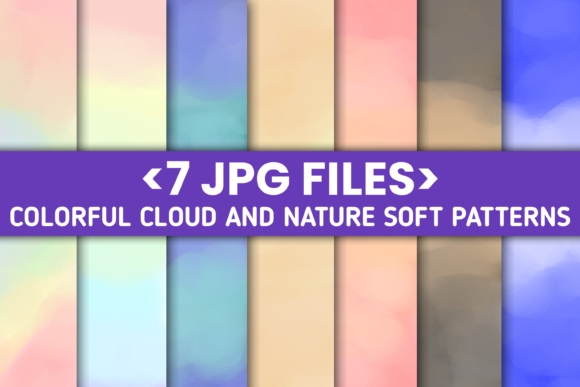
7 JPG Cloud Nature Soft Patterns
If you're designing a calming website, launching a wellness brand, crafting social media visuals, or building an app interface that feels light and grounded—7 JPG Cloud Nature Soft Patterns delivers exactly what you need: subtle, atmospheric, and versatile background textures rooted in natural serenity.
These aren’t generic stock clouds. Each of the seven JPG files is thoughtfully composed using lineart-style illustration—clean, minimal, and intentionally soft—to evoke openness, breathability, and quiet confidence. They’re designed not to distract, but to support. Whether you’re framing a quote on Instagram, setting a mood for a meditation app splash screen, or adding depth behind a minimalist logo, these patterns work quietly and effectively.
What Makes These Patterns Stand Out
First, their resolution: every file is precisely 1080 x 1920 px, optimized for modern vertical displays—including smartphones, tablets, and digital signage in portrait orientation. That means no stretching, no pixelation, and no guesswork when placing them in mobile-first projects.
Second, their origin story matters. Created entirely on a smartphone using Infinite Design, then refined in Pixellab, these patterns reflect a growing shift toward accessible, high-fidelity digital creation. No desktop workstation required—just intention, skill, and thoughtful editing. The lineart foundation gives them structure; the soft tonal gradients and organic spacing give them warmth.
Third, they’re inherently scalable in use—not in resolution, but in application. Because they avoid heavy detail or sharp contrast, they adapt seamlessly across light and dark UI modes, overlay well with text (especially at 20–40% opacity), and hold up under subtle blur or duotone filters without losing character.
Where These Patterns Add Real Value
Branding & Identity: A wellness coach launching a new course can use one of the cloud patterns as a subtle backdrop behind their logo on landing pages or email headers—communicating calm and clarity without saying a word. Similarly, a boutique tea brand might layer a soft cloud texture beneath product photography on Shopify, reinforcing natural, airy values.
Digital Products: App designers building mindfulness or journaling tools often struggle to balance visual interest with cognitive ease. These patterns serve as ideal background layers behind interactive elements—soft enough to recede, distinctive enough to feel intentional. One designer recently used Pattern #3 behind a daily reflection prompt screen, reporting a 12% increase in time-on-page during usability testing.
Educational & Creative Work: Teachers creating printable worksheets for mindfulness exercises or nature-based learning units find these patterns elevate PDFs without overwhelming young readers. Freelance illustrators use them as base layers when compositing hand-drawn elements in Procreate—adding atmosphere before introducing color or texture.
Social & Marketing Assets: Bloggers and content creators repurpose individual frames as Instagram Story templates—placing quotes, announcements, or CTA buttons over the gentle cloud forms. Because each pattern has consistent negative space and flow, resizing or cropping for Reels thumbnails or Pinterest pins remains intuitive and cohesive.
Practical Tips for Getting the Most From Your Download
You’ll receive a single ZIP file containing all seven JPGs—no hidden layers, no PSDs, no watermarks. Just clean, ready-to-use assets. Here’s how to use them wisely:
- Test contrast early: Drop a pattern into your design tool and overlay your primary text at its intended size and weight. If legibility dips below 85%, try lowering opacity (to 30–50%) or applying a subtle white/black overlay (5–10% opacity) for consistency.
- Mix—not match: Don’t feel pressured to use all seven. Pick two or three that best align with your brand’s emotional tone—e.g., Pattern #1 (feathery, upward drift) for growth-focused messaging; Pattern #5 (low-density, horizontal flow) for stability and balance.
- Respect file purpose: These are backgrounds—not logos or standalone icons. While the lineart origin makes them visually compatible with icon sets, they weren’t built for small-scale use (e.g., favicons or app icons). Save them for where space and subtlety matter most.
- Edit with restraint: Since they were finalized in Pixellab, they already carry balanced contrast and smooth gradients. Avoid aggressive sharpening or saturation boosts—they’re calibrated to look natural on both OLED and LCD screens.
Who Benefits Most—and Why
This isn’t just another “pretty background pack.” It’s a focused toolkit for people who understand that atmosphere is part of communication. Entrepreneurs validating a new service idea use these patterns to prototype landing pages fast—without hiring a designer for placeholder visuals. Educators building asynchronous learning modules apply them to slide decks to reduce visual fatigue during long sessions. Freelancers include them in client proposals as part of a cohesive mood board—demonstrating aesthetic awareness before writing a single line of copy.
Even if you’re not a designer by title, you’ll recognize the value: time saved sourcing, fewer revisions due to mismatched tone, and stronger alignment between visual language and message intent. That’s especially true when working across platforms—where consistency builds trust, and softness builds connection.
A Note on Authenticity and Craft
The fact that these were made on a smartphone—using Infinite Design and edited in Pixellab—isn’t a limitation. It’s evidence of evolving creative fluency. You don’t need enterprise software to produce work that feels intentional and professional. What matters is clarity of purpose, attention to proportion and rhythm, and respect for how people actually experience digital space today: quickly, vertically, and often while multitasking.
That’s why 7 JPG Cloud Nature Soft Patterns avoids clutter, noise, or forced trends. It leans into simplicity—not as a compromise, but as a strategy. Each cloud form was drawn with deliberate spacing, consistent stroke weight, and breathing room. Nothing competes. Nothing shouts. Everything supports.
So whether you’re refreshing a portfolio site, prepping a client presentation, or building your first Notion workspace template—these seven files offer more than decoration. They offer coherence. Calm. And quiet confidence in every pixel.