Tie Patterns for Creative Projects
Whether you’re designing a boutique wedding invitation, updating classroom bulletin boards, or prototyping fabric prints for a small-batch apparel line, consistent, high-quality pattern assets make a measurable difference—not just in visual polish, but in how efficiently and confidently you move from idea to finished piece. Tie Patterns fill that precise need: a curated, production-ready set of 10 distinct tie-inspired digital papers designed specifically for real-world creative workflows.
What Makes These Tie Patterns Different From Generic Backgrounds?
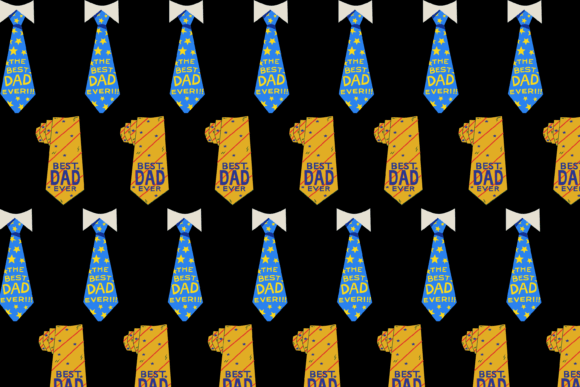
Unlike broad “geometric” or “vintage” pattern packs, Tie Patterns are built around a singular, versatile motif—ties—but executed with intentional variation in scale, line weight, spacing, and rhythm. One pattern features tightly spaced slim neckties in monochrome charcoal; another uses oversized, overlapping bow ties with soft drop shadows for depth; a third layers diagonal silk-textured ties over a subtle linen base. This cohesion-with-contrast means the 10 files work together seamlessly across projects—no visual whiplash when switching between a gift tag and a presentation slide background.
Each file is delivered as a 3000×2000 pixel PNG in RGB color profile—a deliberate choice. That resolution supports sharp printing at common sizes (5×7 cards, A4 paper goods, 16:9 slides) while remaining lightweight enough for quick loading in design apps like Canva, Affinity Designer, or Adobe Express. The PNG format preserves transparency where needed (e.g., overlaying tie motifs on photos), and the RGB profile ensures accurate on-screen previews—critical if you’re sharing mockups with clients or collaborators before final output.
Real-Time Time Savings You’ll Notice Immediately
Think about the last time you spent 20 minutes searching for “subtle tie pattern background,” filtered through dozens of low-res JPEGs, adjusted contrast manually, then cropped to fit your layout—only to realize the repeat doesn’t tile cleanly. With Tie Patterns, that friction disappears. All 10 files are non-repeating, edge-to-edge ready, and sized to scale predictably. Need a background for a Zoom virtual event banner? Open one file, drag it into your canvas, resize to fit—and it’s done. Designing custom wrapping paper for a client’s product launch? Use the high-res PNG as a base layer, add foil accents or text, and export print-ready PDFs without upscaling artifacts.
This isn’t just convenience—it’s reliability. For educators creating printable lesson resources, that means no last-minute font rendering issues when patterns interfere with text legibility. For freelance stationery designers, it means faster client revisions: swap Pattern #3 for Pattern #7 in under a minute, not 15. And for small business owners producing seasonal party kits, it means reusing the same trusted assets across social graphics, email headers, and physical packaging—keeping brand texture consistent without redesigning from scratch.
Where Tie Patterns Add Quiet Strength to Your Work
Patterns communicate tone before a single word is read. A narrow, evenly spaced tie pattern conveys precision and professionalism—ideal for corporate workshop handouts or legal firm greeting cards. A playful, asymmetrical bow tie layout adds warmth and approachability to children’s birthday invites or nonprofit donor thank-you notes. Because these aren’t clipart-style illustrations but thoughtfully composed digital papers, they support subtlety: use them full-bleed for impact, or scale down to 15% opacity as a watermark-like texture beneath headlines.
They also solve practical problems beyond aesthetics. Printing on textured cardstock can mute fine details—Tie Patterns’ clean vector-derived lines hold up well even at 120 dpi inkjet output. For fabric designers sampling digital prints, the 3000×2000 dimensions map cleanly to standard swatch sizes (e.g., 12×8 inches at 250 ppi). And because each file is self-contained in PNG format—no fonts, layers, or linked assets—you avoid compatibility hiccups when sharing source files with printers or collaborators using different software versions.
Who Benefits Most—and Why It’s Not Just About “Crafting”
- Small business owners launching product lines: Use Tie Patterns for cohesive packaging, tags, and web banners—maintaining visual continuity across touchpoints without hiring a designer for every variation.
- Educators and trainers: Create printable worksheets, certificates, or classroom posters with visual hierarchy that guides attention—not distracts from content.
- Bloggers and content creators: Elevate Pinterest pins, ebook covers, or lead magnet designs with distinctive, on-brand texture—without licensing ambiguity (all files are royalty-free for commercial and personal use).
- Freelance designers: Keep a reliable “pattern toolkit” folder for client projects where moodboards call for sophistication but timelines don’t allow custom illustration.
- Hobbyists and makers: Print custom wrapping paper, decoupage sheets, or scrapbook elements with crisp detail—no pixelation, no watermarks, no subscription required.
A Note on Fit and Realistic Expectations
Tie Patterns excel when you need polished, motif-driven texture—not photorealism or hyper-specific themes (e.g., “1920s Art Deco ties” or “nautical rope ties”). They’re intentionally versatile, not narrowly themed. If your project demands exact historical accuracy or ultra-minimalist line art, review the preview thumbnails carefully: some patterns include subtle shading or texture overlays that may not suit ultra-flat design systems. Likewise, while the RGB profile ensures screen fidelity, always soft-proof CMYK conversions separately if ordering large-format printed wallpaper or fabric—color shifts can occur in translation, as with any digital-to-print workflow.
Also worth noting: this is a static set of 10 patterns—not a generative tool or editable vector library. You won’t be adjusting individual tie angles or colors within the files. But that constraint is also its strength: what you see is production-ready. No learning curve, no plugin dependencies, no version conflicts. Just open, place, scale, and go.
How to Get the Most Out of Your Tie Patterns Set
Start simple. Pick one pattern that matches your current project’s energy—formal, whimsical, modern—and use it full-bleed as a background. Then experiment: duplicate the layer, reduce opacity to 30%, and set blend mode to “Multiply” to deepen contrast without losing readability. For social media posts, crop tightly into a repeating section (e.g., a single tie cluster) and use it as a corner accent or border frame. When prepping for print, embed the PNG directly into your InDesign or Illustrator file rather than linking—ensures consistency across devices and outputs.
And remember: consistency builds recognition. Using the same Tie Pattern across a series of holiday cards, email headers, and Instagram story templates creates subconscious cohesion—even if recipients never consciously notice the motif. That quiet repetition is where professional polish lives.
Tie Patterns won’t replace strategic thinking or original concept development. But they do remove one layer of friction between intention and execution—giving you back time, reducing visual guesswork, and supporting clarity across every surface you design for.