Bears, Balloons Background Patterns JPG
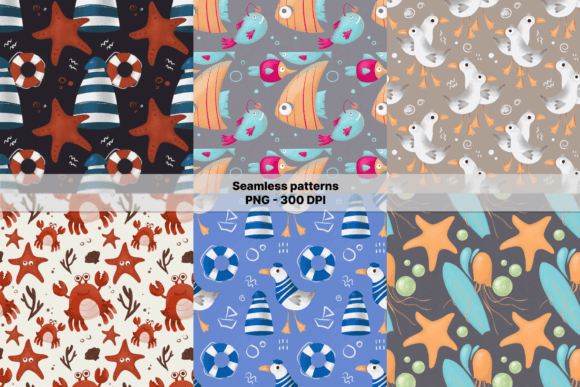
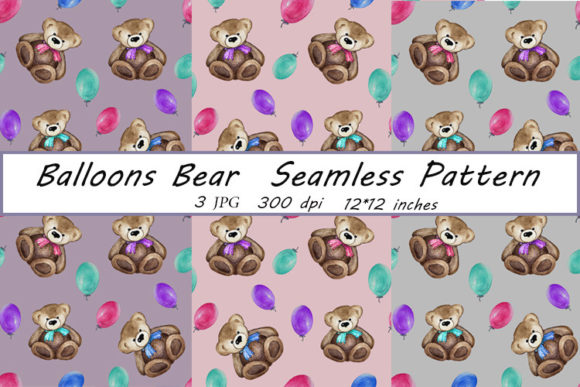
Imagine a cheerful, hand-drawn world where friendly bears float among soft watercolor balloons—gentle, cohesive, and full of quiet charm. That’s the heart of the Bears, Balloons Background Patterns JPG: a set of three high-resolution, seamless patterns created from original watercolor illustrations. Each file is 3600 × 3600 pixels at 300 dpi—perfectly sized for professional printing at 12 × 12 inches. Whether you’re designing greeting cards, custom fabric for baby clothes, wall decals for a nursery, or elegant scrapbook pages, these patterns offer warmth and versatility without sacrificing print-ready quality.
Why this pattern set stands out—and why it’s easy to overlook what matters
Many buyers assume “seamless” means “plug-and-play,” especially when thumbnails look charming online. But not all seamless patterns behave the same way in real projects. With Bears, Balloons Background Patterns JPG, the seamlessness comes from intentional hand-drawn repetition—not digital tiling tricks. That subtle difference shows up when you scale, crop, or repeat the pattern across large surfaces like wallpaper or fabric yardage. If you’ve ever printed a background only to spot awkward repeats or misaligned edges, it wasn’t your design software—it was likely the pattern’s construction.
Another common assumption: “High resolution = ready for everything.” While 300 dpi at 12 × 12 inches covers most print needs, it doesn’t automatically translate to flawless results on every material. For example, printing on textured cotton fabric may soften fine watercolor details, while glossy photo paper will highlight them beautifully. Knowing your output medium *before* you begin helps you adjust contrast or test small swatches—rather than discovering the issue after ordering 50 postcards.
Mistake #1: Using the files without checking color mode or embedding settings
These JPGs are delivered in RGB—not CMYK. That’s ideal for digital use (websites, social media, screen-based presentations) and standard home or office inkjet printers calibrated for RGB. But if you’re sending files to a commercial printer for bulk postcards or wallpaper, they’ll likely ask for CMYK. Converting yourself in Photoshop or Affinity Photo gives you control over how colors shift—especially soft pinks and sky blues in the watercolor washes. Letting the printer convert automatically can mute tones or introduce unexpected greys.
Better approach: Open one file in your editing software, go to Image > Mode > CMYK Color, then preview with View > Proof Colors. Adjust levels or hue/saturation slightly if needed—then save a separate CMYK version labeled clearly. Keep the original RGB intact for digital reuse.
Mistake #2: Assuming “hand-drawn” means “loose and forgiving”—and skipping alignment checks
Watercolor textures bring organic appeal, but they also mean subtle variations in line weight and pigment bleed. When you tile these patterns across a large surface—say, a 48-inch-wide fabric panel—the slight shifts in balloon placement or bear posture become visible at seams unless you verify alignment manually. Unlike vector-based geometric repeats, watercolor patterns rely on precise edge-matching. The creators built that into each file, but zooming in to 200% and checking top-to-bottom and left-to-right continuity takes 60 seconds—and saves hours of rework.
Try this: In Photoshop or GIMP, duplicate the layer, nudge it 1 pixel right, then toggle visibility. Any visible “jump” in color or shape along the seam? That’s your cue to use the Offset filter (Filter > Other > Offset) to fine-tune before finalizing your layout.
Mistake #3: Overlooking licensing scope—and underestimating scalability
The description mentions uses like “dishes, clothes, wallpaper, and stickers”—but it doesn’t say whether those apply to personal, small-batch, or commercial resale projects. Always confirm license terms before producing items for sale—even if it’s just five handmade mugs at a local craft fair. Some pattern licenses allow unlimited physical products but restrict digital redistribution (e.g., selling the JPG itself inside a design bundle). Others require attribution—or prohibit use on merchandise sold via major platforms like Etsy unless upgraded.
Also, while the 3600 × 3600 pixel size works beautifully for 12-inch prints, it won’t scale cleanly to billboard-size murals without interpolation—and even then, fine watercolor granules may blur. For oversized applications, consider commissioning a custom vector redraw or requesting a larger raster version from the seller *before purchase*, if possible.
What to verify before downloading or buying
- File naming & organization: Are the three JPGs clearly labeled (e.g., “bears-balloons-light,” “bears-balloons-soft-blue,” “bears-balloons-warm-cream”)? Consistent naming prevents mix-ups mid-project.
- Preview accuracy: Does the thumbnail reflect actual color balance? View the sample on both a bright screen and a dimmer one—or better yet, check the seller’s real-user photos if available. Watercolor reds and yellows often look warmer on mobile screens than they print.
- Compatibility notes: Does the listing specify compatibility with common tools? These JPGs work in Canva, Adobe Creative Cloud, Affinity Suite, Cricut Design Space, and Silhouette Studio—but layered PSD versions would offer more flexibility for advanced users. If you need layers or transparency, ask before buying.
- Support responsiveness: A quick reply to a pre-purchase question about fabric printing tips or CMYK conversion tells you more about reliability than any star rating.
Real-world use: A better path forward
Say you’re designing a baby shower invitation suite. You choose the soft-blue Bears, Balloons pattern for the background—but instead of applying it full-bleed to every card, try using it as a 30% opacity overlay behind clean white text. That preserves legibility while keeping the whimsy. Or, for fabric printing: order a 6-inch swatch first. Test how the watercolor texture holds up after washing—some pigments lift slightly on low-thread-count cotton, but shine on linen-cotton blends.
These aren’t flaws in the Bears, Balloons Background Patterns JPG. They’re natural considerations with any hand-crafted, print-focused asset. What makes this set genuinely useful is its intentionality: the resolution, the seam alignment, the gentle palette—all chosen to support real creative work, not just visual appeal.
So whether you're a teacher making classroom posters, a small-batch ceramicist adding patterned decals to mugs, or a freelance designer building a brand kit for a children’s wellness app—take those extra moments to match the pattern to your medium, verify your color space, and test before committing. That’s how thoughtful choices turn lovely illustrations into reliable, joyful tools.